

Don't not miss the opportunity to allocate 1.2% of your PIT (personal income tax) to support Vilnius University (VU) Faculty of Physics. This percentage may be split and distributed among several organisations.
There are no extra fees – in just a few minutes, you can allocate part of your income tax to organisations that truly need your support.
Income declaration and the allocation of support by completing form FR0512 are open until 2 May.
We invite our community – working students, academic and non-academic staff, colleagues, alumni, and friends – to allocate their support in just a few minutes.
Below is a list of organisations that actively carry out work for the benefit of the VU Faculty of Physics.
VU Fund Prof. Algis Petras Piskarskas (1942–2022) Subfund for the Support of Laser Physics Research
Recipient: Paramos fondas Vilniaus universiteto fondas
Purpose: A. P. PISKARSKO sub-fund
Recipient code: 304222713
Support allocated to the VU endowment fund and its sub-funds is professionally invested, and scientific talent is funded from the investment returns.
Young Physicists’ School Fotonas
Recipient: Paramos fondas Vilniaus universiteto fondas
Purpose: Young Physicists’ School Fotonas
Recipient code: 304222713
A non-formal education initiative run by the VU Faculty of Physics for the past six years. At the Young Physicists’ School Fotonas, students in grades 7–12 deepen their knowledge of physics.
Recipient: Vilniaus universiteto Fizikos fakulteto Alumnio draugija
FiDi is a celebration included in the Lithuanian Intangible Cultural Heritage Inventory and promotes physics, as well as VU physicists, throughout Lithuania and beyond.
VU Students’ Representation at the Faculty of Physics (VU SA FF)
Recipient: Vilniaus universiteto Studentų atstovybė
Purpose: VU SA FF
Recipient code: 193077294
VU SA FF represents our students, fosters university culture, and creates the most favourable conditions for student self-expression.
Recipient: Vilniaus universiteto Studentų atstovybė
Purpose: VU JEK
Recipient code: 193077294
JEK actively takes an interest and deepens knowledge in of different types of energy from technical, economic, environmental, and political perspectives. Through its activities, the organisation seeks to raise the public’s level of knowledge about energy.
Recipient: Vilniaus universiteto Fizikos fakulteto Alumnio draugija
Purpose: OR‘26
Recipient code: 300041320
Open Readings is a free international conference for students in the physical and natural sciences, designed to give students the opportunity to present their research, receive constructive feedback from specialists in the field, and attend lectures by world-class invited speakers.
Recipient: Vilniaus universiteto Studentų atstovybė
Purpose: VU AK
Recipient code: 193077294
The VU Astronomy Club actively brings together a community of astronomy enthusiasts and seeks to promote the science of astronomy.
You can allocate a portion of your income tax only electronically by logging into the Electronic Declaration System (EDS). For instructions on how to do this, visit the State Tax Inspectorate website at support allocation.

1. Log into → ELECTRONIC DECLARATION SYSTEM (EDS).

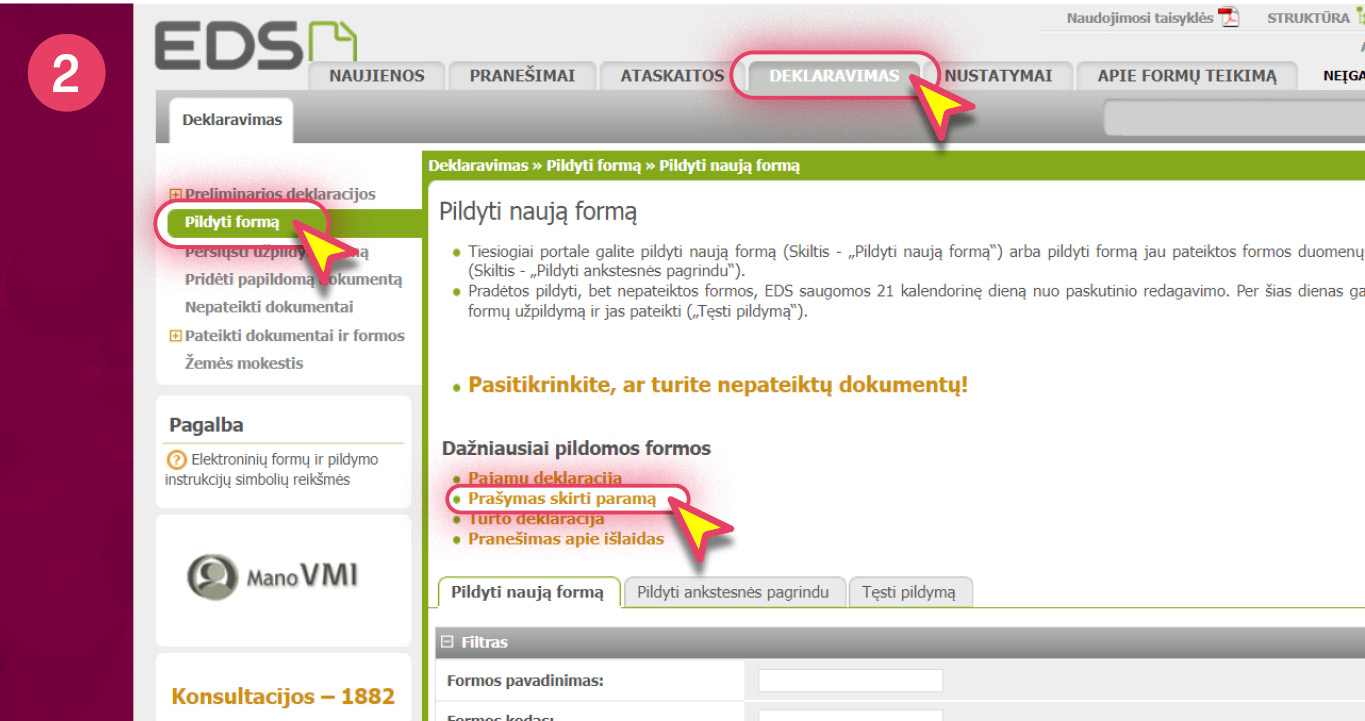
2. Look for PRAŠYMAS SKIRTI PARAMĄ. Make sure DEKLARAVIMAS is selected at the top;
PILDYTI FORMĄ on the left; PRAŠYMAS SKIRTI PARAMĄ in the middle.
3. Start filling out form FR0512 directly on the portal. Click on the GLOBE icon.

Important: now you can switch the language to English.

4. The online guide will assist you in filling out the form. If support for the 2025 tax period was not (or was) allocated, click CONTINUE (or START).

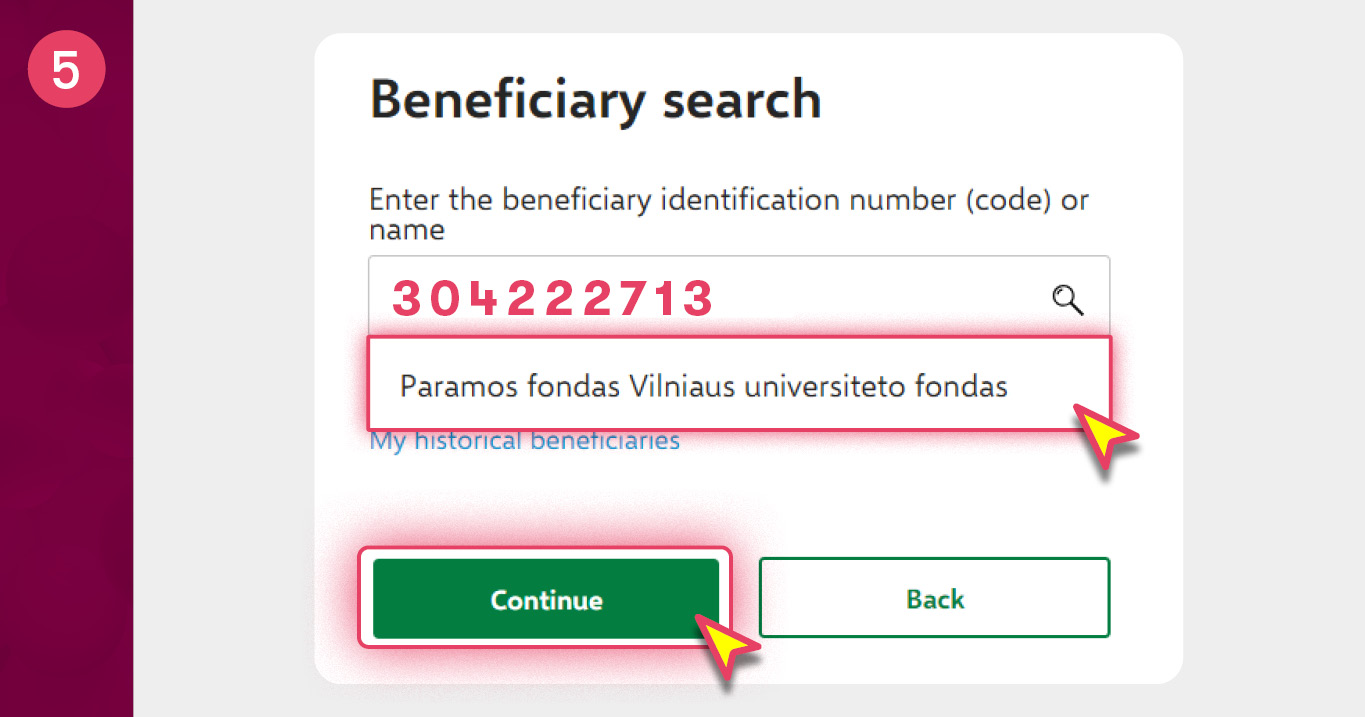
5. In the recipient search window, find, for example, “Paramos fondas Vilniaus universiteto fondas”.
In the search field, enter our identification number for e.g. - 304222713 or the name.
6. Portion of tax: 1,2. Tax period: 2029. When the support is allocated to the unrestricted endowment fund, it is not necessary to specify the purpose of the part of the tax.
When the support is allocated to the restricted sub-fund or other activities, please fill-in the box with the short name of the chosen sub-fund or the purpose of the other activity.

7. Confirm that the entered data is correct.

8. Form a request.

9. Submit the request.
